DVDShrink.info Chetwood's DVD Snippets guides downloads  
back to previous page next page

Chetwood's DVD snippets

Latest update 05/31/2005: DVD Shrink 3.2 deutsch released!

Aufgrund zahlreicher Mailanfragen ist einer der besten Transcoder nun frühzeitig in der offiziellen, komplett eingedeutschten Version ohne DeCSS erhätlich. Weitere Info dazu hier.

For those of you not speaking german: with support from dvdshrink himself I've finally found the time to release the official german version of DVD Shrink. It's derived from the same code base as the final DVD Shrink 3.2 so you do not miss out on anything if you stick to the english version.

However, contrary to what I said in my last update you might wanna switch to MultiShrink 1.4 even if you're not going to use the german version of DVD Shrink since I fixed a little bug so the log file finally comes with carriage return and linefeed, doh.

While you're here you might also be interested in my guide on importing selfmade menus to episode DVDs .

MultiShrink: a small tool to enable DVD Shrink batch processing

MultiShrink Since dvdshrink unfortunately won't release another version of his great tool (apart from translated versions done by others) which lacks support for batch processing I've scripted a small tool using AutoIt to process several instances of DVD Shrink.

How it works:

Download the self-extracting rar archive and install it's contents to a directory of your choice. Start up as many instances as DVDs you want to encode in a row. Adjust backup settings you're going to use in each instance, e.g. preferred streams, start/end frame, compression, target device, quality settings, etc.

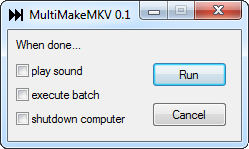
Select 'Backup DVD' and adjust those settings as well: target format, target directory, quality settings and so on. Once you've done this in all instances open up MultiShrink, adjust settings and select 'Run'.

MultiShrink will now start the backup process with the last instance of DVD Shrink that you had opened and background to the tray to check every 60 secs whether the 'Backup Complete' window exists. As soon as it does (which obviously means that Shrink has completed backing up a DVD), this instance of DVD Shrink will be closed and the next one will be starting another backup and so on until all backups are done. Once all backups are through MultiShrink will terminate itself after having executed those actions you checked in the settings.

Check out the readme.html for info on the settings. For comments/questions/bug reports please visit this MultiShrink thread over at the Digital Video Forums.


All the best, and "Happy Shrinking!!" Smilies shrinks a DVD
Chetwood